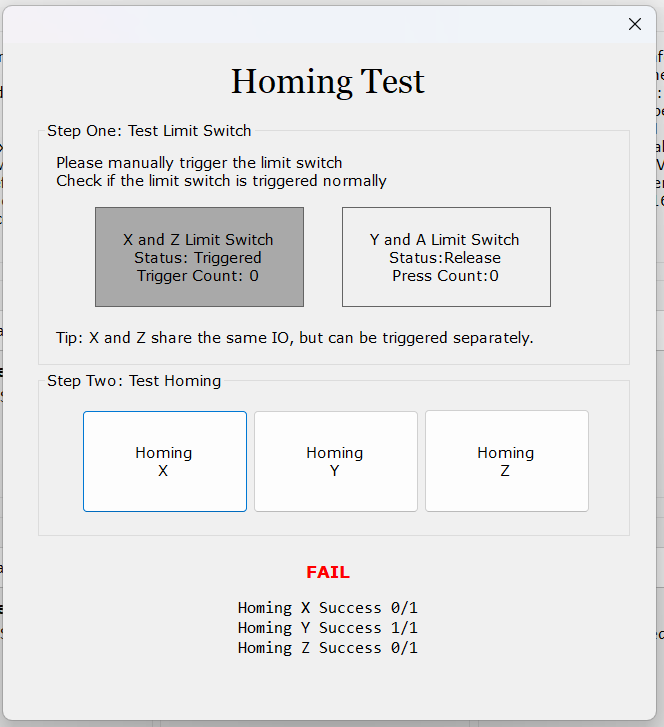
Hello, please help. I use Lightburn 2.1.04, Neje soft v6.8.5., everything is updated. I have a problem with the axes. The laser does not go home. I send a screenshot from Ligburn and a test in Neje soft.
Also, one glitch that causes the laser to stop during engraving and not finish the work.
Please advise.
LightBurn console: ALARM:8
Navádění selhalo. Cyklu se nepodařilo vymazat koncový spínač při rozjezdu. Zkuste zvýšit nastavení odtahu nebo zkontrolujte zapojení.
The screen shot of the test you posted, only shows the ‘y’ axis switch being triggered. pushing them manually should register on that test… I have seen a few posts on those switches failing. hence they changed their board design to stall detection… I prefer switches, but that’s me.
Alarm 8 is also to do with limit switches. could be pull off distance to small, debounce timing, or faulty switch
I need to confirm your device model first. NEJE devices adopt a sensorless homing mode. It uses a MEMS sensor to detect the stepper motor status for homing detection. Compared with traditional limit switch homing, it is more reliable and requires simpler wiring.
If you encounter abnormal homing, please check whether the mechanical movement along the X or Y axis is smooth, and confirm whether the wiring connections are normal.
I noticed you shared LightBurn materials and screenshots from the NEJE software. The NEJE software is a great way to test whether the stepper motors are working properly. The issue is most likely mechanical. You can adjust the eccentric nuts or timing belts to improve movement smoothness.
I am writing to report a major bug in your latest firmware updates (v2.2.x / v2.3.x) regarding the NEJE Max 4 V1 (Mechanical/Hybrid version).
Your software automatically pushes firmware updates meant for the Max 4 V2 (which uses full stall sensing / no-reset-button homing). When this firmware is installed on a Max 4 V1 with a physical mechanical switch on the X-axis and Z-axis, it completely breaks the homing cycle, causing permanent ALARM:8 and ALARM:9 errors because the motherboard logic for Normally Open / Normally Closed pins gets mixed up.
Even after rolling back to firmware v2.0.1, GRBL settings like $5, $22, and $23 conflict between the physical X/Z switches and the sensor-based Y-axis. The only way to make the machine move without motor grinding is to disable hard homing entirely ($22=0) and use manual macros.
Please update your NEJE Control Software / Firmware Center so that it distinguishes between Max 4 V1 (Mechanical Switches) and Max 4 V2 (Stall Sensing) to prevent other users from bricking their homing cycles.
This indicates that the new firmware version has no issues.
I think the problem with your device is that your limit switch is malfunctioning. I observed that your X switch is in a triggered state, which should indicate that the limit switch is pressed. If your limit switch is not pressed but is showing a triggered state, you need to check if your switch is damaged. You can check this page for specific help:
I pasted the information:
Limit switch function is normal
Manual Test: Try pressing the limit switch with your finger. When pressed, the limit switch should make a ‘Click’ sound. Removing your finger should cause it to spring back up normally. If your device’s limit switch cannot be pressed and released normally, please record a video and contact us.
Software Test: If the limit switch can be pressed and released normally, please open the Homing Test interface for troubleshooting. When you press the limit switch, the corresponding limit switch in the software will be triggered (its color will turn dark, as shown in the image below).
Please note: The X-axis and Z-axis limit switches share the same channel; triggering either one will cause the limit switch to be triggered.
The number of times you press the switch will be recorded. The switch status displayed in the software should match the physical status of your device. If there are any problems, please contact us.